 ProxyNest
The proxy switcher that takes your whole proxy list.
Paste proxies in any seller format, log in to authenticated proxies automatically, check each IP’s location and speed, and stop WebRTC leaks — in one Chrome extension.
Free for 3 proxies · Pro $19 once · 7-day free trial, no card · No account, no tracking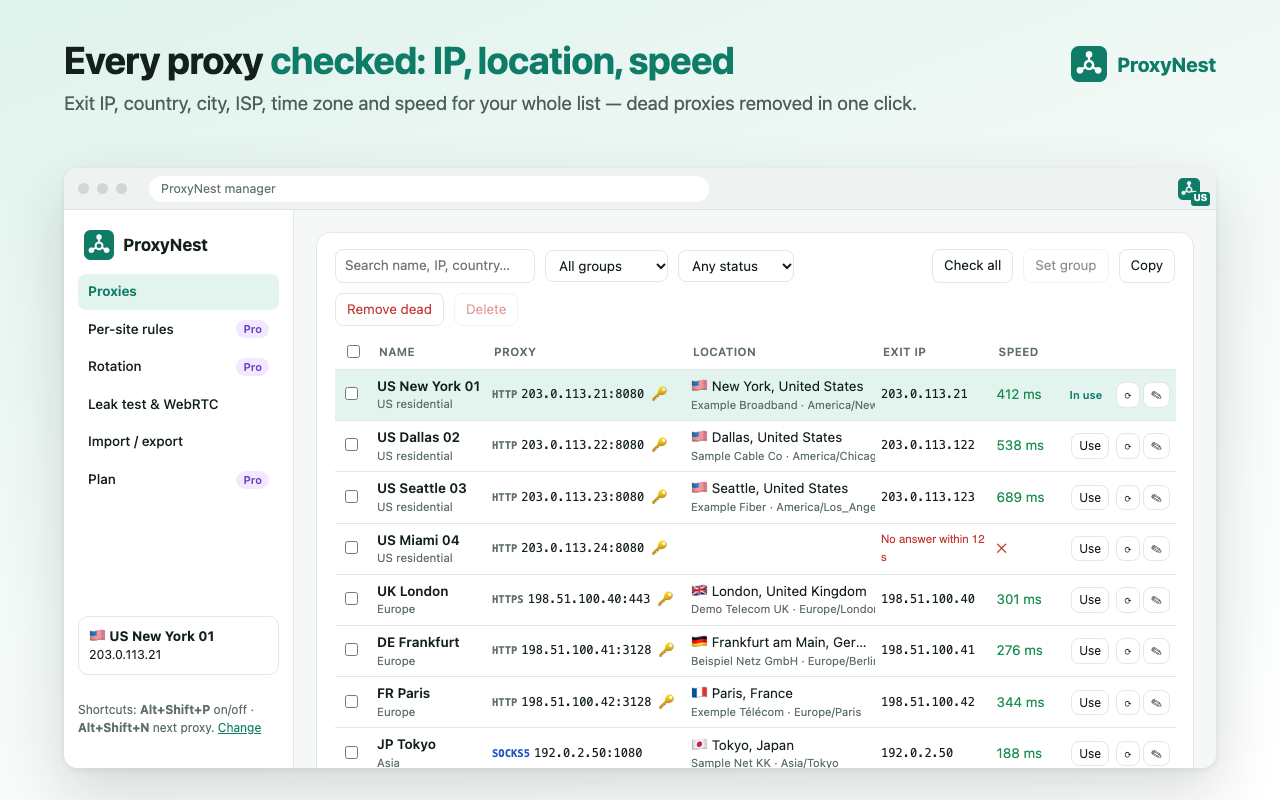
Built for people who juggle many proxies
Paste any proxy list
ip:port, ip:port:user:pass, user:pass@ip:port, user:pass:ip:port, socks5:// and http:// URLs, CSV — mixed in one paste. Duplicates and bad lines are flagged with line numbers.
Logins that just work
Username/password proxies log in automatically with Chrome’s MV3 proxy-auth API. Wrong passwords are detected instead of looping on a login popup.
Health check in bulk
Speed, exit IP, country, city, ISP and time zone for every proxy, six at a time, without switching your browser. Remove dead proxies in one click.
Leak test
See your real IP next to the IP websites see, and what WebRTC exposes. One click turns on WebRTC protection.
Per-site rules
Send selected sites through a chosen proxy, everything else direct (or the other way around). Never-proxy list and local-network bypass.
Quick switch & rotation
Switch from the toolbar, Alt+Shift+P to toggle, Alt+Shift+N for the next proxy. Rotate through a group every N minutes. The badge shows the exit country.
Made for marketers checking ads and search results in other countries, social media managers, QA testers and anyone who buys proxies. Your proxies and passwords stay in your browser.
How it compares
| ProxyNest | Typical proxy switcher | |
|---|---|---|
| Bulk paste in mixed formats with auto-detect | ✓ | One proxy at a time, one format |
| Proxy username/password in Manifest V3 | ✓ automatic, wrong passwords detected | Often a login popup or broken |
| Exit IP + country, city, ISP, time zone per proxy | ✓ bulk | – |
| Leak test (real IP vs proxy IP, WebRTC) | ✓ | – |
| Time zone / language mismatch warning | ✓ | – |
| SOCKS5 + password | Explained clearly (Chrome can’t do it) | Fails silently |
| If the proxy goes down | Pages stop loading (no silent leak) | Varies |
Pricing
Free
3 proxies · automatic login · quick switch & shortcuts · leak test & WebRTC protection · check one proxy at a time
Pro Lifetime
Pay once. Unlimited proxies, bulk import, bulk health check, remove dead, groups, per-site rules, rotation.
Pro Monthly
Same Pro features, month to month. Cancel any time.
Start a 7-day Pro trial inside the extension — no card. Payments by Lemon Squeezy (merchant of record).
FAQ
Does ProxyNest sell proxies?
No. ProxyNest manages proxies you already have from any provider. It works with HTTP, HTTPS, SOCKS5 and SOCKS4 proxies.
Can I use proxies with a username and password?
Yes. ProxyNest answers the proxy’s login request automatically with the credentials you saved, using Chrome’s Manifest V3 proxy authentication API. If the password is wrong it tells you instead of showing endless login popups.
Why can’t I use SOCKS5 with a password?
Chrome itself does not support username/password authentication for SOCKS5 proxies, so no extension can add it. ProxyNest marks those proxies and suggests the fix: use the HTTP port most providers offer for the same proxy, or authorize your IP address with the provider.
Can each tab use a different proxy?
No — Chrome applies proxy settings to the whole browser profile. ProxyNest can route by website instead (per-site rules), and you can use separate Chrome profiles if you need fully separate setups.
What happens if my proxy goes down?
Pages stop loading until you switch proxy or turn it off. ProxyNest does not silently fall back to your real connection, so your real IP is not exposed by surprise.
Where are my proxies and passwords stored?
Only in your browser (chrome.storage.local). ProxyNest has no server and no account. Passwords are sent only to the proxy that asks for them.
Is there a free version?
Yes. The free plan handles 3 proxies with automatic login, quick switching, keyboard shortcuts, the leak test and WebRTC protection. Pro ($19 lifetime or $2.99/month) adds unlimited proxies, bulk import and health checks, groups, per-site rules and rotation. Pro has a 7-day free trial with no card.
Guides
- How to use a proxy with a username and password in Chrome
- How to bulk import a proxy list into Chrome
- Proxy list formats explained: ip:port:user:pass, user:pass@ip:port and URLs
- How to check a proxy’s exit IP, country, city and ISP
- How to test proxy speed and remove dead proxies in bulk
- How to fix a WebRTC leak in Chrome when using a proxy
- How to use a proxy only for certain websites in Chrome
- SOCKS5 with a username and password in Chrome: why it fails and what to do
- A Proxy SwitchyOmega alternative for Chrome in 2026
- A FoxyProxy alternative for Chrome with bulk import and IP checks
- How to rotate proxies in Chrome automatically
- Chrome proxy not working? Fixes for the common errors
- Proxy time zone and language mismatch: what it means